Database
The database allows you to describe data tables: lists of entities in your game. Data tables can be used to store information about characters, items, clues, or any other type of object that might appear in your game. With a data table, you can edit this information in a central place, then use it in the game when needed. It’s especially useful for adding simulation and RPG elements to your game.
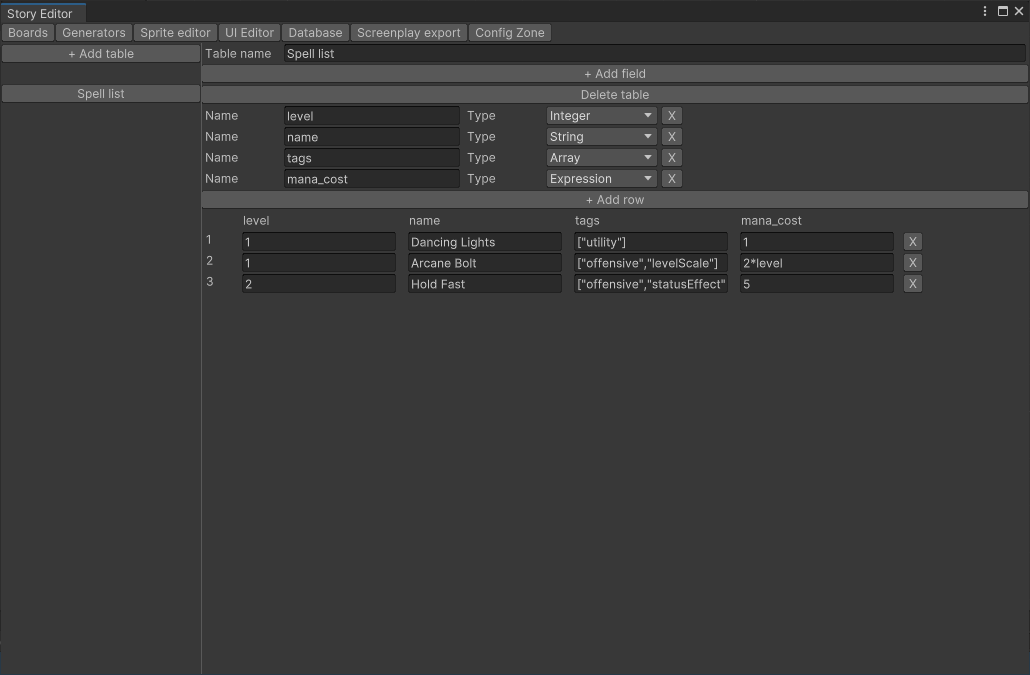
On the left-hand side of the window is a list of tables defined in the database. Clicking one of these will open it in the editor.
At the top of the main panel you can see the table’s name, followed by the +Add field button. This will add a new field – essentially the same as a variable – to the table. You can set the field’s Name and Type (integer, float, string, array, object, or stored expression), or remove it with the X button at the right. Be careful when editing the field list: changing the type of the field will destroy any existing data.
Below the field list is the + Add row button, which adds a new row to the end of your data table. (Alpha alert: Table rows can’t currently be reordered.)
At the bottom of the window is a list of the table’s rows, in order. These can be edited here, or deleted using the X button.
During the game, data can be retrieved from a data table using the getData(), getDataRange(), and getDataRow() functions; see the expression reference for more information on these.
Remember that data stored in the database is immutable: it can’t be changed during the game. If you need to modify something defined in a data table, the best way is to make a copy of the data by storing it in a variable; you will then be able to modify the variable like any other.