Storylets
Overview
A storylet is a snippet of a game narrative that the player experiences based on the conditions of the game world. An alternative to traditional branching narratives, storylets are useful for non-linear games made up of various discrete scenes that can be experienced in various orders depending on the player’s progress, situation, and luck. The word ‘storylet’ was invented in 2010, and is normally associated with modern Western interactive fiction - but the structure it describes is used in many classic Japanese visual novels, such as the 1994 dating sim Tokimeki Memorial.
In VNKit, Storylets are Boards with the Storylet option applied. The player can then be sent to any Storylet that has conditions that fit the player’s current situation. VNKit also allows you to integrate these Storylets within a traditional branching narrative, letting you mix up both approaches however you like.
An analogy, with some animated gifs
In a traditional branching narrative, story will flow in a strict direction based on player choices - like a complex marble run with many different exits and switches. The marble might end up reaching various end points, but in a specific, predictable order designed into the machine.
Pictured: A visual novel with a branching narrative.With storylets, each potential part of the story is catalogued and tagged, like index cards in a pre-computer-age library. Also like cards, the storylets don’t need to be in any particular order, and can be shuffled and dealt. When the player reaches a point where a storylet is summoned, VNKit gathers every card labelled to fit the player’s situation, then shuffles the stack and deals a card out to the player at random.
Pictured: A visual novel with storylets.


Setting up a Storylet in the Board viewer

In the top right hand corner of the Board viewer, you can toggle the Storylet status on and off for a Board. When the box is checked, conditions for the Storylet will appear. These conditions allow you to describe the circumstances under which the Storylet will be eligible to be given to the player. See Expression reference for more about defining conditions.
You can also put tags on the Storylet, for your own reference, and as another way of identifying relevant Storylets for the game.
Jumping to a Storylet in your game
The action Jump to Storylet allows you to jump to any eligible storylet. You can set additional filtering for it here.
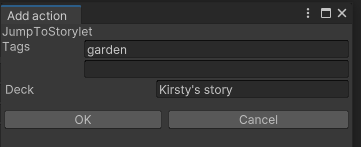
In this screenshot, VNKit will be looking for:
- a Storylet with fulfilled conditions,
- tagged ‘garden’,
- in the Deck “Kirsty’s story”.
All of these have to be fulfilled.
If there are no storylets which fit the profile, then the game won’t jump anywhere. If there is a connected Node, the game will continue to it instead.