Step 5 - Variables - working with arithmetic
Incrementing a variable
Astra, in our game, is going to have a value that represents how she feels about us. She’ll like us more if we’re good students, and less if we mess around.
Making an exact model of the blurry, confusing world of human emotion isn’t possible in a computer game (or in science, or pretty much anything else), but we can make something close enough for a video game by representing Astra’s feelings as a number. If the number goes up, she likes us more, and if it goes down, she likes us less. We can then create Node structures which check the number, and flow to different places depending on how high it is, letting Astra express her feelings to us in words and actions.
We’ll have Astra like us more when we tell her we’re ready to use VNKit, so on the Node just after we have done this, we will add an Action and set a variable representing Astra’s emotions.
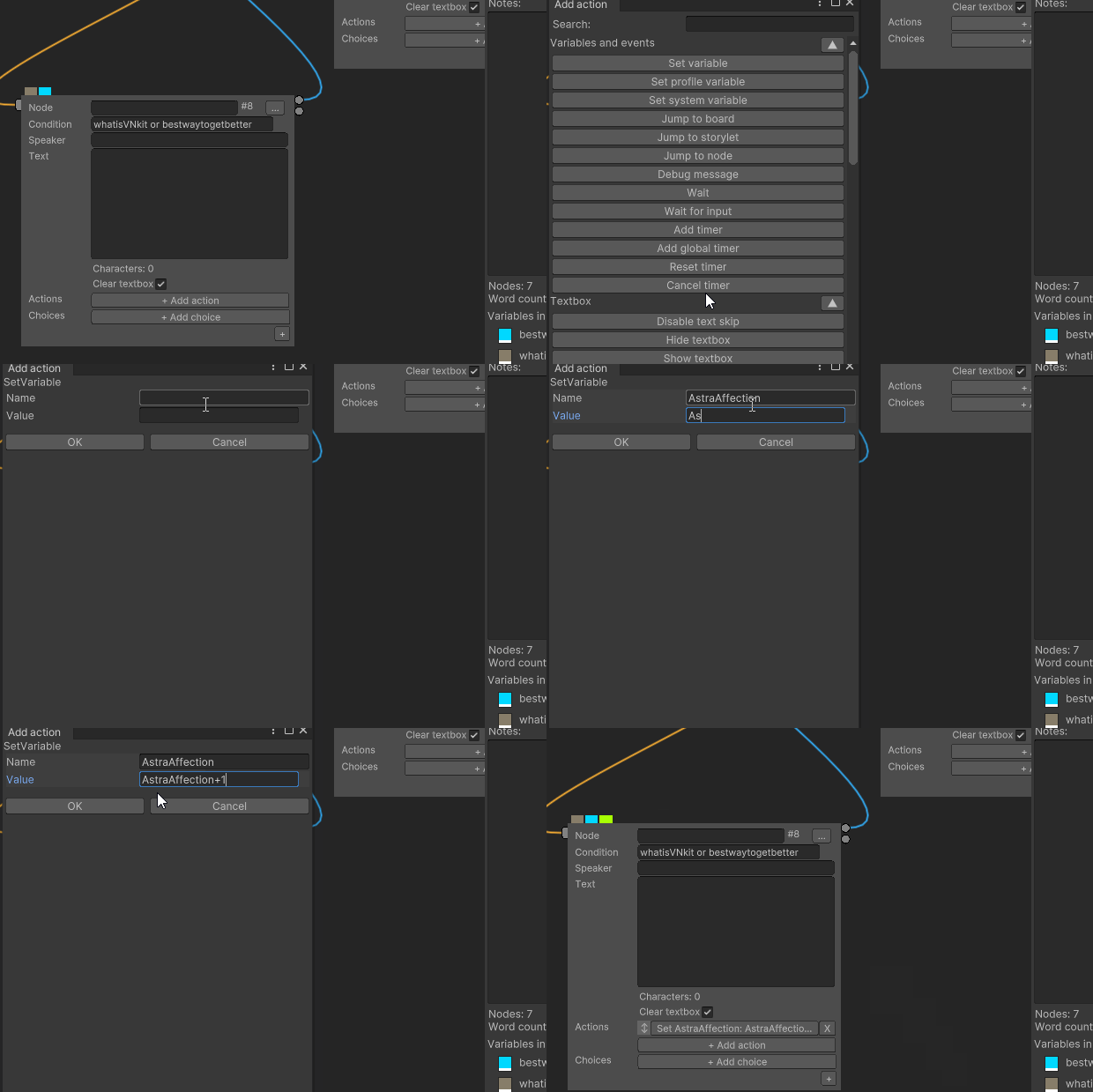
SetVariable
Name: AstraAffection
Value: AstraAffection+1
We have to say Value: AstraAffection+1 because VNKit needs to have perfectly unambiguous instructions on which numbers it’s supposed to add together - if we instead just said Value: +1, it would create an error. What we’re trying to do is to add 1 to what the value was before, so we state it like this.
Good practices
It’s true that since this is the first point that we can gain
AstraAffectionin the game, we could just set the variable to1, but if we wanted to go back and create other ways to get Affection earlier in the game, we’d have to change everything. Doing it this way allows us to create our visual novel with more flexibility.
But if we run the game right now, we’d get an error. It’s impossible to add 1 to AstraAffection because we haven’t told VNKit what AstraAffection is to start with. A variable that hasn’t been given a value yet equals null, a value that represents “nothing”. You can think of null as like an empty box, or a blank piece of paper - it’s impossible to do any arithmetic with null, because it isn’t even a number. We need to assign a number value to AstraAffection so we can use it.
Init
We have to set AstraAffection before the first point that we are going to use it in the story. Since we might go back and add earlier points, the best place to put it is in a new node before the first Node. We’ll set it as the new Start Node. Name it “Init” (short for “Initialisation”) by typing that in the Node box. On this Node, we will use another SetVariable action and set AstraAffection to 0.
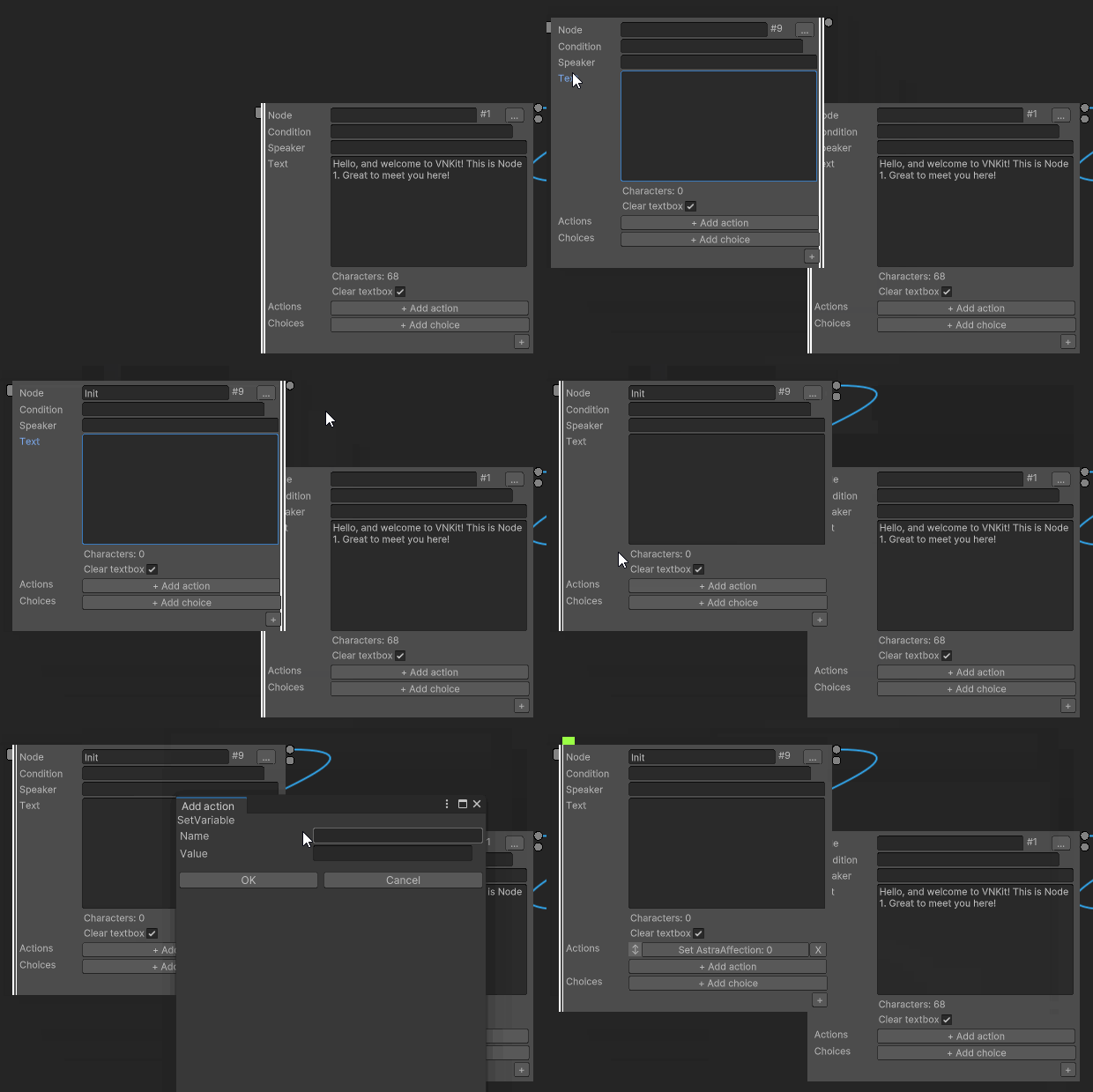
SetVariable
Name: AstraAffection
Value: 0
Now, when the player adds 1 to Astra’s affection value, it will be added to 0, which is a valid operation in VNKit.
Decrementing a variable
Let’s also add an event to our game that causes Astra to like the player character less.
If we wanted to, we could just do the same as what we did above:
SetVariable
Name: AstraAffection
Value: AstraAffection-1
…But this would allow us to go into negative numbers. That could be fine (it’s a common way of designing an affection system - where 0 is perfectly neutral, negative numbers express negative feelings and positive numbers express positive feelings) but in our game, we don’t want the number to be able to go below 0. (Astra isn’t ever going to really dislike the player - she’s just going to like us more if we’re good students.)
We have to use different syntax to keep the number from going below 0
SetVariable
Name: AstraAffection
Value: max(AstraAffection-1, 0)
What this does is compare AstraAffection-1 to 0, and sets the AstraAffection variable to whichever is higher.
While this is a little arbitrary when dealing with a number representing an abstraction, like Affection values, this is important when working with variables relating to physical objects - coins in the player’s wallet, chocolate boxes left to give to the boys on Valentine’s Day, or bullets in a gun. (What would -3 bullets look like?)
Game design tip - Affection values
Novice designers of romance games often set up points where one choice increases Affection, while another choice decreases it. In games where a player is actively pursuing a certain character, the Affection point value remaining the same is already a punishment on its own. There are compelling games which use increasing/reducing binary choices for a romance mechanic (such as 1997’s Final Fantasy VII), but these tend to be games where romantic interactions are a minor thread in a game mostly about something else. If you’re making a game where romance is your main mechanic, it’s best to only reduce affection points when the player significantly upsets the other character. Remember - the player is already ‘losing’ points by not taking the opportunity to increase them!